
Use Microsoft 365 Backup for fast native restores within the Microsoft ecosystem, and add a third-party or managed backup when your organization needs isolation, retention beyond one year, Teams chat coverage, Entra ID protection, or a recovery set that lives outside Microsoft's control plane.
That's the short answer. The longer one depends on your risk profile, compliance obligations, and whether your team has the capacity to own backup operations end to end.
Immediate actions for IT decision-makers:
- Enable Microsoft 365 Backup if your tenant is licensed and your workloads are in scope (Exchange Online, OneDrive for Business, SharePoint Online)
- Assess gaps: Does your organization need immutable copies stored outside Microsoft? Do you retain Teams chat data? Do you need Entra ID backup? Do compliance rules require retention past one year?
- Run a gap analysis against your RPO/RTO targets and compliance framework before assuming native backup is sufficient
- If you lack in-house DR capacity or operate in a regulated sector, contact Rivell for a managed backup assessment
The rest of this guide walks through every decision point in detail, from what Microsoft actually covers to what questions to ask an MSP before signing anything.
Table of Contents
- What does Microsoft actually protect, and what falls on you?
- What does Microsoft 365 Backup actually cover?
- When is native backup not enough?
- What are your architecture options for Microsoft 365 backup?
- How do you choose the right Microsoft 365 backup solution?
- How do you implement Microsoft 365 backup step by step?
- Rivell's managed Microsoft 365 backup and recovery service
- Key Takeaways
- Why managed backup usually wins for SMBs
- Useful sources for IT teams evaluating Microsoft 365 backup
- Rivell manages your Microsoft 365 backup so recovery is never a question mark
What does Microsoft actually protect, and what falls on you?
Microsoft operates under a shared responsibility model that is frequently misread by IT teams. Microsoft owns the physical infrastructure, platform availability, geo-redundant replication, and service uptime SLAs. You own everything else.
Microsoft's responsibilities:
- Physical data center security and hardware
- Platform availability and service uptime
- Geo-redundant replication of live data across regions
- Protection against infrastructure-level failures
Your responsibilities as the customer:
- Backing up data and enabling point-in-time recovery
- Long-term retention beyond Microsoft's default windows
- Identity management, MFA enforcement, and admin access controls
- Recovery procedures and DR plan testing
- Compliance with industry-specific retention and audit requirements
The most dangerous misconception in Microsoft 365 administration is treating litigation hold or Purview retention policies as backup. They are not. Litigation hold preserves content for legal discovery; it does not give you a fast, point-in-time restore of a mailbox or a SharePoint site. If a user accidentally deletes three months of email and you need it back by end of business, a litigation hold will not save you. Neither will a Microsoft 365 retention policy configured for compliance purposes.
Pro Tip: Start with two actions before anything else: enable Microsoft 365 Backup to cover Exchange, OneDrive, and SharePoint, then enforce MFA across all admin accounts. Those two steps close the most common recovery and identity-compromise gaps simultaneously.
What does Microsoft 365 Backup actually cover?
Microsoft 365 Backup is a first-party service that protects Exchange Online mailboxes, OneDrive for Business accounts, and SharePoint Online sites. Teams channel files are covered because they live in SharePoint. What is not covered natively: Teams chat messages, Entra ID (Azure AD) objects, Planner data, and third-party app data stored outside these workloads.
Restore point frequency and retention
Restore behavior differs by workload, and the differences matter for your RPO calculations.
| Workload | Restore Point Frequency | Retention Window |
|---|---|---|
| Exchange Online | Every 10 minutes | Up to 1 year |
| OneDrive for Business | Every 10 minutes (last 14 days); weekly beyond that | Up to 1 year |
| SharePoint Online | Every 10 minutes (last 14 days); weekly beyond that | Up to 1 year |
| Teams channel files | Covered via SharePoint | Same as SharePoint |
| Teams chat messages | Not covered | Not applicable |
| Entra ID | Not covered | Not applicable |
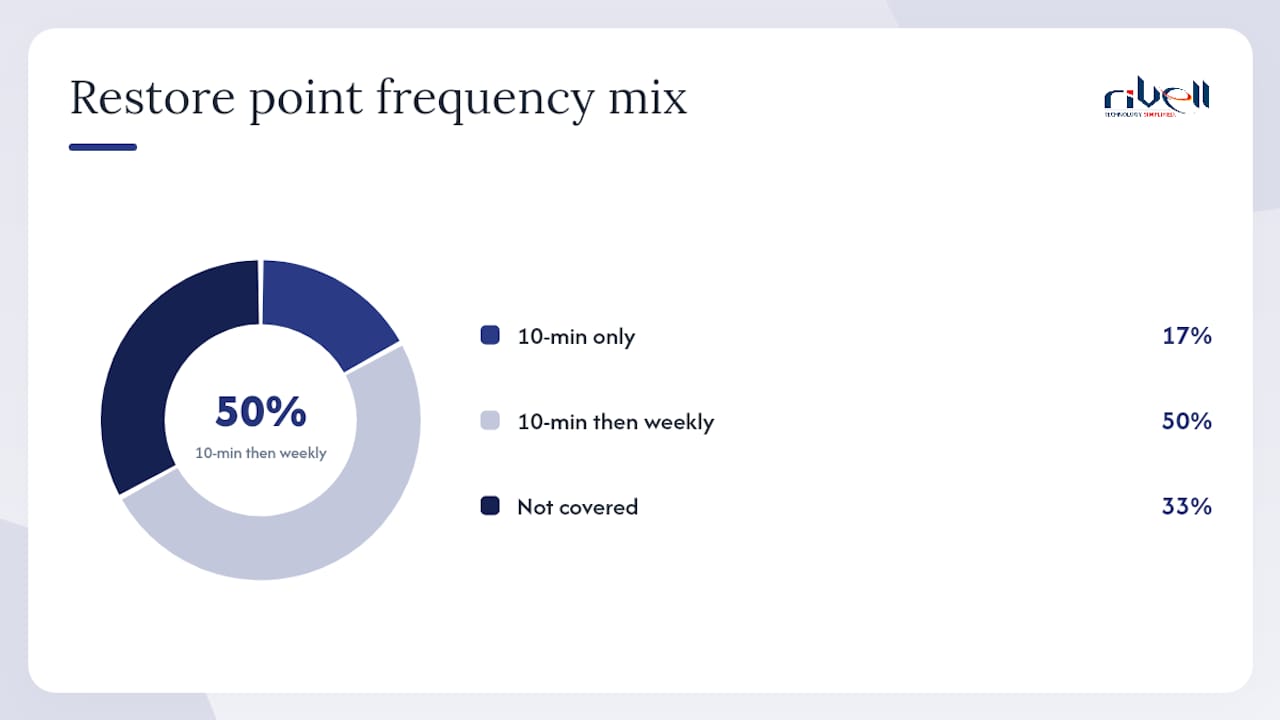
Exchange gets the most granular protection with frequent restore points for the trailing year. OneDrive and SharePoint get frequent restore points for the most recent period, then less frequent snapshots for the remainder of the year. That distinction matters if a SharePoint corruption goes undetected for three weeks and you need to restore to a specific day within that window.
Storage model and pricing
The native service uses an append-only architecture that prevents existing backup points from being overwritten. When ransomware hits your tenant, it cannot reach back and corrupt the backup data because new writes are appended rather than replacing existing blocks. Retention policy expiry is the only mechanism that removes data.
The pay-as-you-go storage rate for Microsoft 365 Backup is $0.15 per GB per month. Cost scales with data volume, churn rate, and how long you retain backup storage. A tenant with heavy email volume and high document churn will accumulate storage faster than a lean operation.
Geo-residency options align with your Microsoft 365 tenant region. The backup data stays within the same geographic boundary as your production data, which matters for data sovereignty requirements.
When is native backup not enough?
Native Microsoft 365 Backup is a real improvement over relying on retention policies alone. But independent analysis confirms that several gaps remain, and for many organizations those gaps are the ones that matter most.
The gaps that push organizations toward third-party or managed backup:
- No out-of-tenant immutable copy. Append-only architecture protects backup points from overwrite, but the backup data still lives inside Microsoft's control plane. A compromised Global Admin account or a catastrophic tenant-level event can still affect your recovery options. A truly isolated copy stored outside Microsoft's infrastructure adds a layer that native backup cannot provide.
- No Teams chat backup. Teams chat is increasingly where decisions get made and commitments get recorded. Native backup does not cover it. For legal hold and forensic purposes, this is a significant gap.
- No Entra ID backup. If your Entra ID tenant is corrupted or objects are deleted at scale, native backup offers no restore path. Recovering user accounts, group memberships, and conditional access policies manually is a multi-day project.
- Retention capped at one year. Healthcare organizations under HIPAA, law firms under state bar rules, and financial services firms under SEC or FINRA requirements often need data retained for three, five, or seven years. Native backup stops at 365 days.
- No multi-tenant management. MSPs and IT teams managing multiple tenants need a single pane of glass for backup status, alerting, and restores. Native backup is per-tenant only.
- Limited forensic and eDiscovery integration. Compliance-driven restores for litigation or regulatory investigation benefit from purpose-built eDiscovery tooling that native backup does not provide.
Use-case mapping:
- Regulated organization (healthcare, legal, financial): Needs multi-year retention, immutable evidence, and defensible deletion. Native backup alone does not meet the bar.
- Organization under active litigation: Needs forensic-grade preservation and chain-of-custody documentation beyond what backup provides.
- High-churn environment: Rapid document creation and deletion means weekly snapshots beyond 14 days may miss critical restore points. A third-party solution with daily or more frequent snapshots fills that gap.
- Heavy Teams/chat usage: Any organization where Teams chat is a primary business record needs a dedicated chat backup solution.
Pro Tip: If your organization has ever been through an audit, a legal hold, or a ransomware incident, map those specific recovery scenarios against what native backup can actually restore. The gaps become obvious fast.
For ransomware recovery specifically, the cyber attack recovery steps that matter most are the ones you tested before the incident, not the ones you figure out during it.
What are your architecture options for Microsoft 365 backup?
Four distinct architectures exist, and each makes different trade-offs between control, isolation, cost, and complexity.
Native Microsoft 365 Backup (first-party) Microsoft manages the backup infrastructure. Restore performance is fast because backup and production data share the same platform. The append-only design resists ransomware overwrite. The trade-off: backup data lives inside Microsoft's control plane, retention is capped at one year, and workload coverage has the gaps noted above. Best fit for organizations that want a simple, low-overhead starting point and whose compliance requirements fit within the one-year window.

Backup Storage platform apps (ISV solutions built on Microsoft APIs) The Microsoft 365 Backup Storage platform lets independent software vendors build backup applications on top of Microsoft's backup APIs. These partner-built solutions can match native restore performance while adding features like extended retention, multi-tenant management, and broader workload coverage. The control plane still has a Microsoft dependency, but the application layer and storage destination can be managed independently. Best fit for organizations that want native-speed restores with additional features from a vetted ISV.
Third-party SaaS backup (independent BaaS) Fully independent backup services that pull data from Microsoft 365 via APIs and store it in their own infrastructure, completely outside Microsoft's control plane. These solutions typically cover Teams chat, Entra ID, and other workloads that native backup misses. Immutability, air-gap options, and long-term retention are standard features. The trade-off: restore performance depends on the third-party service's infrastructure, and you are managing a separate vendor relationship. Best fit for organizations with strict isolation requirements, multi-year retention needs, or complex compliance obligations.
Hybrid/on-premises archive Data is exported or replicated to on-premises storage or a private cloud archive. This model gives maximum control over data sovereignty and retention but requires the most operational overhead. For organizations with existing on-premises backup infrastructure and the staff to manage it, a hybrid approach can complement native backup effectively. Best fit for organizations with strict data residency requirements or existing investments in on-prem storage.
For most SMBs and mid-market organizations, the practical choice is between native backup plus a third-party SaaS layer, or a managed service that handles both. Business continuity network architecture decisions, including network dependencies for cloud restores, should be factored into whichever model you choose.
How do you choose the right Microsoft 365 backup solution?
Start with your recovery requirements, not the feature list. The question is not "does this product back up SharePoint?" It is "can I restore a specific SharePoint site to a specific point in time within two hours, and can I prove it in a test?"
Decision framework:
Map your organization's risk profile to these five dimensions before evaluating any solution:
- RPO: How much data loss is acceptable? Minutes, hours, or days?
- RTO: How fast must recovery complete? Same day, same hour, or within 15 minutes?
- Retention: How long must data be retained? One year, three years, seven years?
- Coverage: Which workloads must be protected? Exchange, SharePoint, OneDrive, Teams chat, Entra ID?
- Authorization model: Who can authorize a destructive action (delete backup data)? Single admin or multi-user approval?
Procurement checklist for IT leaders:
- Exchange Online, SharePoint Online, and OneDrive for Business are covered
- Teams chat messages are covered (or explicitly out of scope with a documented plan)
- Entra ID objects are covered
- Immutable backup copies exist outside the primary control plane
- Encryption at rest and in transit with customer-managed key options
- Geo-residency controls align with your data sovereignty requirements
- MFA and least-privilege access for backup administration
- Multi-user authorization required for destructive storage operations
- API-based restores with documented RTO SLAs
- Restore testing is included in the service or contract, not optional
- DR plan documentation is provided or supported
Questions to ask vendors and MSPs:
- Where is backup data stored, and is it outside Microsoft's control plane?
- What is the documented RTO for a full mailbox restore? A full site restore?
- How is immutability enforced, and who can override it?
- Does the solution require a single admin to delete backup data, or is multi-user authorization enforced?
- How are Teams chat messages backed up and restored?
- How is Entra ID protected and restored?
- What retention periods are supported, and what is the cost model for extended retention?
- How often are restore tests conducted, and what documentation is provided?
- What is the process for a tenant-level recovery event?
- How does the solution handle multi-tenant environments?
Red flags to walk away from:
- No immutability guarantee or vague language about "backup protection"
- A single admin account can delete all backup data without secondary approval
- No documented restore testing cadence or SLA
- Teams chat and Entra ID are listed as "roadmap" items with no committed date
- Pricing is opaque or changes significantly with data growth
Operational best practices from independent guidance consistently point to the same conclusion: an untested backup is not a backup. Any vendor that cannot show you a restore test result should not be on your shortlist.
How do you implement Microsoft 365 backup step by step?
A well-run implementation takes four to eight weeks for most SMBs, and eight to sixteen weeks for mid-market organizations with complex compliance requirements. The difference is almost always in the scoping and policy configuration phases, not the technical deployment.
Implementation checklist:
- Policy configuration: — Set retention windows, backup schedules, and scope rules. Configure Microsoft 365 retention policies and labels for compliance workloads separately from backup policies.
Timeline estimates:
Pro Tip: Schedule quarterly restore drills as a recurring calendar event before you finish the implementation. Teams that plan to "test restores regularly" without a fixed date almost never do. Test file-level, mailbox-level, and site-level restores separately, and document the actual recovery time against your RTO target each time.
For validating your DR plan beyond backup, disaster recovery plan verification is a separate but closely related exercise that should run on the same quarterly cadence.
Rivell's managed Microsoft 365 backup and recovery service
Rivell handles Microsoft 365 backup management end to end for businesses in New Jersey, including policy configuration, monitoring, recovery testing, and compliance support. For organizations that lack in-house DR capacity or operate in regulated sectors, that means backup is no longer a task that falls through the cracks between quarterly IT reviews.
What Rivell covers:
- Microsoft 365 Backup configuration and ongoing management for Exchange, OneDrive, and SharePoint
- Backup monitoring with alerting for failed jobs and storage anomalies
- Quarterly restore drills with documented RTO/RPO results
- Compliance support for healthcare (HIPAA), legal, and other regulated industries
- Entra ID and Teams coverage planning as part of a broader DR strategy
- Integrated disaster recovery services that connect backup to a tested recovery plan
Best fit for:
- SMBs in New Jersey without a dedicated backup administrator
- Healthcare practices, law firms, and financial services firms with multi-year retention requirements
- Organizations that have experienced data loss or a ransomware event and need a tested recovery posture
- Teams that have Microsoft 365 but have never run a restore test
Rivell brings over 25 years of managed IT experience and a local presence that means fast response when recovery is not a drill. Microsoft 365 implementation and consulting is part of the same service stack, so backup configuration connects directly to your broader Microsoft 365 environment rather than being bolted on separately.
Pro Tip: Ask any MSP you evaluate to show you the last restore test they ran for a client in your industry. If they cannot produce documentation with actual recovery times, that tells you everything about how seriously they treat backup operations.
Key Takeaways
Native Microsoft 365 Backup covers Exchange, OneDrive, and SharePoint with frequent restore points and retention for up to one year at $0.15/GB/month, but organizations with compliance obligations, Teams chat records, or Entra ID dependencies need a layered approach that extends beyond what Microsoft provides natively.
| Point | Details |
|---|---|
| Enable native backup first | Microsoft 365 Backup covers Exchange, OneDrive, and SharePoint for $0.15/GB/month with frequent restore points. |
| Identify your gaps | Teams chat, Entra ID, and retention past one year are not covered natively — assess these before assuming you're protected. |
| Demand immutability and isolation | Backup data stored only inside Microsoft's control plane is not a fully independent recovery set; require an out-of-tenant copy for high-risk environments. |
| Test restores quarterly | An untested backup is not a backup; run file-level, mailbox, and site restores on a fixed schedule and document actual recovery times. |
| Rivell for managed coverage | Rivell manages Microsoft 365 backup, recovery testing, and compliance support for New Jersey businesses that need a fully owned DR posture. |
Why managed backup usually wins for SMBs
The honest case for managed backup is not about features. It is about what actually happens to backup programs when they are owned by a team that has fifteen other priorities.
Native Microsoft 365 Backup is genuinely good. The append-only architecture, the 10-minute restore points for Exchange, the pay-as-you-go pricing — these are real improvements over where Microsoft was three years ago. But a backup program is not a product you configure and forget. It is a process: monitoring, testing, adjusting retention as data grows, updating runbooks when the org chart changes, and running restore drills that someone has to schedule, execute, and document.
Most SMBs do not have a person whose job is backup operations. They have an IT admin who also handles help desk tickets, vendor calls, and whatever the CEO's laptop is doing this week. That person will configure backup correctly on day one. The quarterly restore test will slip to semi-annual, then annual, then "we should really do that." The runbook will be a year out of date when it matters most.
Managed backup solves the operations problem, not just the technology problem. The value is not the software. It is the accountability structure that keeps the program running when everything else is competing for attention. Recovery time, tested restores, and audit-ready documentation are the three metrics that tell you whether a backup program is real or theoretical.
Useful sources for IT teams evaluating Microsoft 365 backup
These primary sources are worth bookmarking for configuration details, API documentation, and independent analysis as you build or refine your backup strategy.
- Microsoft 365 Backup – Microsoft Adoption
- Microsoft 365 Backup Storage – Microsoft Adoption
- Microsoft 365 backup overview — Microsoft Docs
- Microsoft 365 Backup — Microsoft
- SaaS shared responsibility: What vendors don't cover | TechTarget
- Does Microsoft 365 Back Up My Data? — Wasabi blog
- Do I Really Need a Backup for Microsoft 365? — CrashPlan
- Shared Responsibility Model for Microsoft 365 — AvePoint blog
Rivell manages your Microsoft 365 backup so recovery is never a question mark
Most New Jersey businesses running Microsoft 365 have some form of backup configured. Far fewer have a tested recovery plan, documented restore times, or a process that runs without someone manually remembering to check it. That gap is exactly where Rivell operates.
Rivell's managed IT services for small businesses include Microsoft 365 backup management, quarterly restore testing, compliance documentation, and integrated disaster recovery planning. Healthcare practices, law firms, and regional businesses across New Jersey work with Rivell because backup is one piece of a fully managed IT environment, not a standalone product with no one watching it.
If your organization has never run a documented restore test, or if your current backup coverage has gaps in Teams chat, Entra ID, or long-term retention, the right next step is a straightforward assessment. Contact Rivell to schedule one and find out exactly where your recovery posture stands.