
Most small businesses pay within a typical range per user per month for managed IT support, with the majority paying in the lower to middle portion of that range according to pricing data compiled across U.S. providers. That number covers help desk access, monitoring, patching, and basic security for one employee's devices. It is not the whole bill.
If you run a 25-person office, expect a baseline monthly quote somewhere between $2,500 and $5,000, before add-ons. The national midpoint sits near $142 per user, though your actual number depends on where you're located, what industry you're in, and how much hand-holding your team needs.
A few things to know before you start collecting quotes:
- What's typically included: remote monitoring, a help desk, patch management, and basic antivirus protection.
- Who pays more: healthcare practices, law firms, and any business handling regulated data.
- The simplest budgeting rule: take whatever per-user number a vendor quotes you and add 20% for the add-ons almost everyone ends up needing.
Key Takeaways
Per-user IT support pricing in the U.S. typically runs $100 to $250 per month per employee, with cost driven primarily by compliance needs, device count, and required response times.
| Point | Details |
|---|---|
| Typical price band | Most SMBs pay $100–$200 per user monthly; national midpoint sits near $142. |
| Scale changes the math | Per-user medians rise with company size, from about $120 at small firms to $170 at larger ones. |
| Compliance adds cost | HIPAA, SOC 2, or similar requirements commonly add 20–50% over baseline pricing. |
| Quotes hide exclusions | Onboarding, major projects, and full disaster recovery are usually billed separately. |
| Rivell's approach | Builds per-user quotes around device count, compliance, and response times, with over 25 years serving New Jersey businesses. |
Table of Contents
- IT Support Cost Per User: Pricing by Model at a Glance
- How Do Different IT Support Pricing Models Actually Work?
- What's Included in a Per-User IT Support Package?
- What Drives IT Support Cost Per User Up or Down?
- What Does IT Support Cost for 10, 25, or 100 Employees?
- Which Contract Terms Actually Affect Your IT Support Price?
- How Do You Choose the Right IT Support Pricing Model?
- How Does an Experienced MSP Actually Price Per-User Support?
- Ready to See What Your Actual Per-User Cost Would Be?
- Frequently Asked Questions
- Sources
IT Support Cost Per User: Pricing by Model at a Glance
Not every provider bills the same way, and the model matters as much as the rate. Here's how the major structures stack up.
| Pricing Model | Typical Range | Best For | What's Usually Included |
|---|---|---|---|
| Per-user/month | $100–$250/user | Knowledge-work teams with multiple devices per employee | Help desk, monitoring, patching, basic security, M365 admin |
| Per-device/month | $50–$150/device | Device-heavy environments (warehouses, retail POS) | Monitoring and patching per machine, no user-level support |
| Hourly/break-fix | $100–$300+/hour | Businesses with light, occasional IT needs | Reactive repairs only, no proactive monitoring |
| Tiered flat-fee | $85–$350/user | Businesses wanting bundled service levels | Varies by tier, from basic support to full security stack |
| Co-managed | Custom, often $50–$150/user | Companies with an internal IT person needing backup | Overflow support, specialized tools, after-hours coverage |
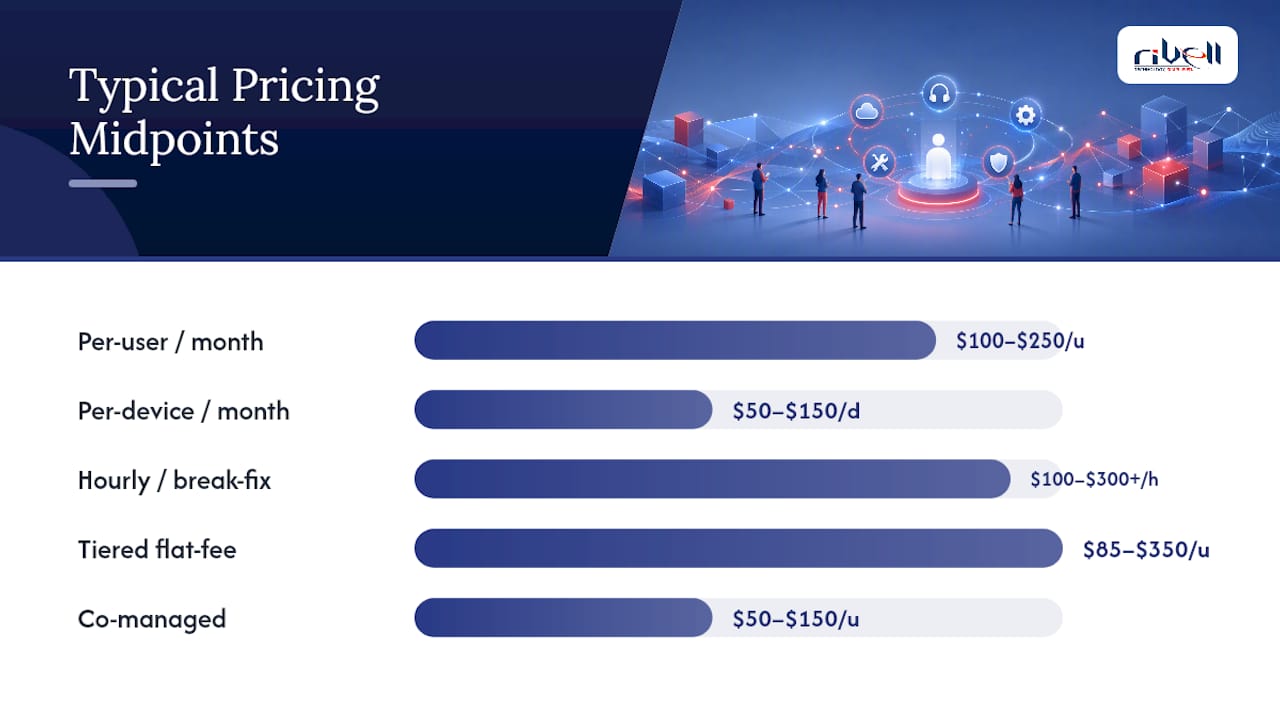
Most SMBs with 10 to 100 employees settle into the $100 to $200 per-user band, according to benchmark data from actual MSP agreements. Rates climb in expensive metro markets and drop slightly in lower-cost regions, but the spread between the cheapest and priciest quotes for identical scope can run from roughly $85 to $350 per user, per national pricing statistics.
One catch: quoted per-user fees rarely include everything. Onboarding, major migration projects, and heavy compliance work typically get billed separately, which is why the number on a proposal's front page is rarely the number on your first invoice.
How Do Different IT Support Pricing Models Actually Work?
Per-user pricing charges a flat monthly rate for each employee, covering every device that person uses. This model dominates for office-based SMBs because a single employee today might use a laptop, a phone, and a tablet, and billing per person instead of per machine keeps the math simple.
Per-device pricing flips that logic, charging for each machine regardless of who uses it. It works better for warehouses, manufacturing floors, or retail locations where devices outnumber people. Per-device rates run lower per node but get unpredictable fast once employees start using three or four endpoints each.
Hourly and break-fix support bills only when something breaks. There's no monthly retainer, which sounds appealing until a server crashes and the invoice arrives at $150 to $300 an hour.
Tiered packages bundle services into good/better/best levels, letting you pay less for basic monitoring or more for full security and compliance coverage.
Co-managed IT supplements an existing internal IT hire rather than replacing them, useful for companies that need specialized security tools or after-hours coverage but don't want to outsource everything.
Value-based pricing is newer and less common. Instead of billing per user or device, the vendor charges based on outcomes like uptime guarantees. It is worth watching, but per-user billing remains the default for most SMB contracts.
The tradeoff across all five: predictability goes up as flexibility goes down. Per-user and tiered models make budgeting easy but can feel expensive if you have seasonal staff. Hourly billing looks cheap until you need it most.
What's Included in a Per-User IT Support Package?
A standard per-user managed plan bundles a predictable set of services. Knowing what belongs in that bundle, and what doesn't, is the single fastest way to compare two vendor quotes that look nothing alike.
Commonly included:
- Remote monitoring and management (RMM) software running quietly in the background
- Help desk access during business hours
- Patch management for operating systems and common software
- Basic backup for critical files
- Antivirus and endpoint detection (EDR)
- Microsoft 365 or Google Workspace administration
Commonly excluded or billed extra:
- Onboarding and initial network assessment fees
- Major migration projects (server replacement, office moves)
- Full backup and disaster recovery (BDR) beyond basic file backup
- 24/7 live human support (many plans only guarantee after-hours ticketing)
- Compliance audits for HIPAA, SOC 2, or similar frameworks
| Category | Typically Included | Typically Extra |
|---|---|---|
| Monitoring | RMM, basic alerts | Advanced SIEM/log analysis |
| Support | Business-hours help desk | 24/7 live phone support |
| Backup | File-level backup | Full disaster recovery, offsite replication |
| Security | Antivirus, EDR | Compliance audits, penetration testing |
| Admin | M365/Workspace management | Custom app deployment |
Line up two quotes side by side against this table before you decide either one is cheaper.
What Drives IT Support Cost Per User Up or Down?
Two businesses with the same headcount can get wildly different quotes, and it usually comes down to a handful of variables.
Company size matters more than people expect. Benchmark data shows per-user medians rising with scale: companies with 1 to 10 employees average around $120 per user, while those with 101 to 250 employees average closer to $170. Larger companies typically need more complex network architecture, which raises the baseline even as the per-user price theoretically benefits from volume.

Device count per employee pushes cost up directly. An employee with a laptop, phone, and two monitors connected to a docking station represents more endpoints to secure than someone using a single machine.
Compliance requirements add real money. Healthcare practices under HIPAA, law firms handling privileged data, or any business pursuing SOC 2 typically see premiums of 20% to 50% over baseline pricing, depending on the controls required and how much documentation the framework demands.

24/7 live support carries a similar premium. Vendors staffing live phone coverage around the clock charge more than those offering next-business-day response.
Geography shifts labor costs. A provider in a high-cost metro pays technicians more, and that gets reflected in your rate.
Pro Tip: *Ask your vendor which of their standard security tools you can skip without creating real risk. A lot of "premium" tiers bundle features aimed at enterprise clients that a 15-person accounting firm simply doesn't need.
What Does IT Support Cost for 10, 25, or 100 Employees?
Numbers get clearer with real scenarios. Here's what three common business sizes might pay under different models, using the per-user ranges established above.
- 10-employee office. A per-user plan at $120 to $180 per user runs $1,200 to $1,800 per month, or $14,400 to $21,600 annually. The hourly alternative might look cheaper on paper at $150 per hour, but a single server outage requiring 8 hours of emergency work costs more than a full month of managed service.
- 25-employee company. At $130 to $190 per user, expect $3,250 to $4,750 monthly ($39,000 to $57,000 annually). This is where in-house hiring starts looking tempting, but a single IT hire with benefits typically costs more than the entire managed contract while covering only business hours.
- 100-employee company. Per-user medians settle around $170, per company-size benchmark data, putting the baseline near $17,000 monthly before add-ons. At this scale, many businesses shift to hybrid models: internal staff for daily requests, an MSP for infrastructure, security, and after-hours coverage.
For a closer look at how these figures stack up against hiring in-house staff, the math tends to favor managed services below the 150-employee mark.
Which Contract Terms Actually Affect Your IT Support Price?
The rate on page one of a proposal rarely tells the full story. What's buried in the contract's fine print often matters more.
Watch for these clauses specifically:
- Onboarding fees, often billed separately and sometimes running $500 to $2,000 depending on network complexity.
- Minimum contract terms, typically 12 to 36 months, which limit your flexibility if service quality slips.
- Headcount change clauses that dictate how pricing adjusts when you hire or lay off staff.
- Response-time SLAs versus resolution-time SLAs. A vendor promising a 15-minute response isn't promising a 15-minute fix.
- Included onsite hours, since remote-only plans often bill onsite visits separately.
A plan guaranteeing 99.9% uptime with 15-minute response times costs meaningfully more than one promising next-business-day service. That gap is the price of urgency, not padding.
Pro Tip: Ask vendors for phased onboarding instead of a lump-sum setup fee. Many will spread the cost over the first three months of the contract rather than charging it all upfront, which helps your cash flow without changing the total price.
How Do You Choose the Right IT Support Pricing Model?
Comparing quotes gets easier with a structured process instead of gut instinct.
- Define your requirements first. List device count, compliance needs, and required response times before requesting quotes.
- Collect apples-to-apples quotes. Send every vendor the same scope document so you're comparing identical service levels.
- Check SLAs and inclusions line by line using the inclusions table from earlier in this guide.
- Verify security and compliance credentials if you're in healthcare, legal, or finance.
- Ask for references from clients of similar size and industry.
- Review the onboarding plan in writing before signing anything.
Questions worth asking every prospective vendor:
- What's explicitly excluded from the per-user rate?
- How long does onboarding typically take?
- What's the escalation path when a ticket isn't resolved on time?
- Will we have direct access to monitoring tools and reporting?
Red flags that should end the conversation: vague scope language, no written SLAs, unclear pricing for "optional" add-ons that turn out to be essential, and any single-person shop claiming to offer real 24/7 coverage. One technician cannot staff round-the-clock support alone, no matter what the contract says.
How Does an Experienced MSP Actually Price Per-User Support?
After more than 25 years managing IT for businesses across New Jersey, Rivell builds per-user quotes around three variables: scope of devices per employee, compliance requirements, and desired response times. A healthcare practice handling patient records gets priced differently than a professional services firm with standard office needs, even at identical headcounts.
Discounts typically show up for longer contract terms or when a client consolidates multiple locations under one agreement. Premiums apply when a business needs after-hours coverage or falls under regulatory frameworks requiring documented controls.
The businesses that get the best value aren't the ones chasing the lowest per-user number. They're the ones who know exactly what they need covered before they start comparing quotes, then negotiate based on that scope instead of a sticker price.
Rivell's approach centers on:
- Full ownership of the client's IT environment rather than piecemeal ticket resolution
- Proactive monitoring designed to catch problems before they cause downtime
- Compliance-specific packages for healthcare and legal clients
When Does Per-User Pricing Make the Most Sense?
Per-user pricing works best for knowledge-work businesses where most employees use two or three standard devices and don't need highly specialized tooling. If your team fits that profile, it is usually the simplest model to budget against and negotiate. Companies with heavy device counts per person, or those needing project-based infrastructure work, often do better with a co-managed or hybrid arrangement. Regulated industries should expect meaningful add-ons regardless of which base model they choose.
Ready to See What Your Actual Per-User Cost Would Be?
Every quote in this guide is a range, because your real number depends on your device count, compliance needs, and response-time expectations. Rivell builds quotes the same way it recommends you evaluate them: starting with a discovery call to map your current environment, followed by a scope definition and sample statement of work before any number gets attached to it.
To get an accurate estimate, have your device count, current software licenses, and any compliance requirements ready before that first conversation. Rivell's onboarding process typically includes a full network assessment so nothing gets missed between the quote and the first invoice, a step that catches most of the "hidden" costs this guide warned about.
Use the inclusions checklist and red flags from earlier sections when you review any quote, including one from Rivell. If the scope isn't crystal clear in writing, ask again before signing.
Ready to see where your business lands? Request a no-obligation assessment and get a per-user estimate built around your actual environment, not a generic template.
Frequently Asked Questions
What is the average IT support cost per user per month? Most small and medium-sized businesses pay between $100 and $200 per user per month for managed IT support, with the national midpoint sitting near $142. Rates above that typically reflect compliance needs or after-hours coverage.
Is per-user or per-device pricing better for a small business? Per-user pricing usually works better for office-based teams where employees use multiple devices, since it covers every endpoint under one flat rate. Per-device pricing fits environments with more machines than people, like warehouses or retail locations.
How much does IT support cost for a 25-person company? A 25-employee business typically pays between $3,250 and $4,750 monthly for a standard managed IT plan, depending on compliance requirements and add-ons like advanced security or full disaster recovery.
Why do IT support quotes vary so much between vendors? Quotes differ based on what's included in the base rate. Two vendors quoting $150 per user might mean very different things: one may include 24/7 live support and full backup, while the other charges those as separate add-ons.
Does hiring in-house IT staff cost less than managed IT support? For most businesses under 100 employees, a single in-house IT hire with salary and benefits often costs more than a full managed IT contract, while covering only business hours instead of continuous monitoring.
This article is general information, not a substitute for advice from a qualified financial advisor. Consult a qualified financial professional about your own circumstances before acting on anything here.
Sources
These sources informed the pricing ranges and benchmarks throughout this guide:
- Managed IT Services Pricing: 2026 Per-User Cost Guide
- Small Business IT Benchmarks Report 2026 | SerenIT
- Managed IT Services Pricing Statistics (2026 Rates)